

Download Jumplist-Launcher – jumplists, taskbar, shortcuts, Windows 7, system tray, productivity, customization, organization, desktop optimization
Overview
Jumplist-Launcher is a free utility designed to enhance the functionality of the Windows 7 taskbar by enabling users to create customizable jumplists. This application provides a streamlined method for organizing and accessing frequently used shortcuts, folders, websites, and applications directly from the system tray. By offering a pop-up menu accessible via right-click on the taskbar, Jumplist-Launcher improves workflow efficiency for users who rely on quick access to digital resources. The tool is particularly beneficial for individuals seeking to declutter their desktop environment and optimize navigation without requiring complex setup.
Targeted primarily at Windows 7 users, Jumplist-Launcher serves as a productivity booster for professionals, students, and power users who manage multiple projects or applications daily. Its ability to group shortcuts into logical categories supports better task management and reduces time spent searching for files or launching programs. The developer, Ryan J. Boudreaux, has designed the app with simplicity and usability in mind, focusing on core functionality without unnecessary bloat. Although the developer did not provide additional technical details, the app’s lightweight nature and free availability suggest a focus on accessibility and practicality.
Within the broader software ecosystem, Jumplist-Launcher fills a niche for users who want to extend the built-in capabilities of Windows 7. While modern operating systems have evolved with more advanced taskbar features, this tool remains relevant for legacy environments where customization and efficiency are still valued. Real-world use cases include organizing project-specific shortcuts, managing development tools, or creating quick-access menus for common web services.
Key Features & Functionality
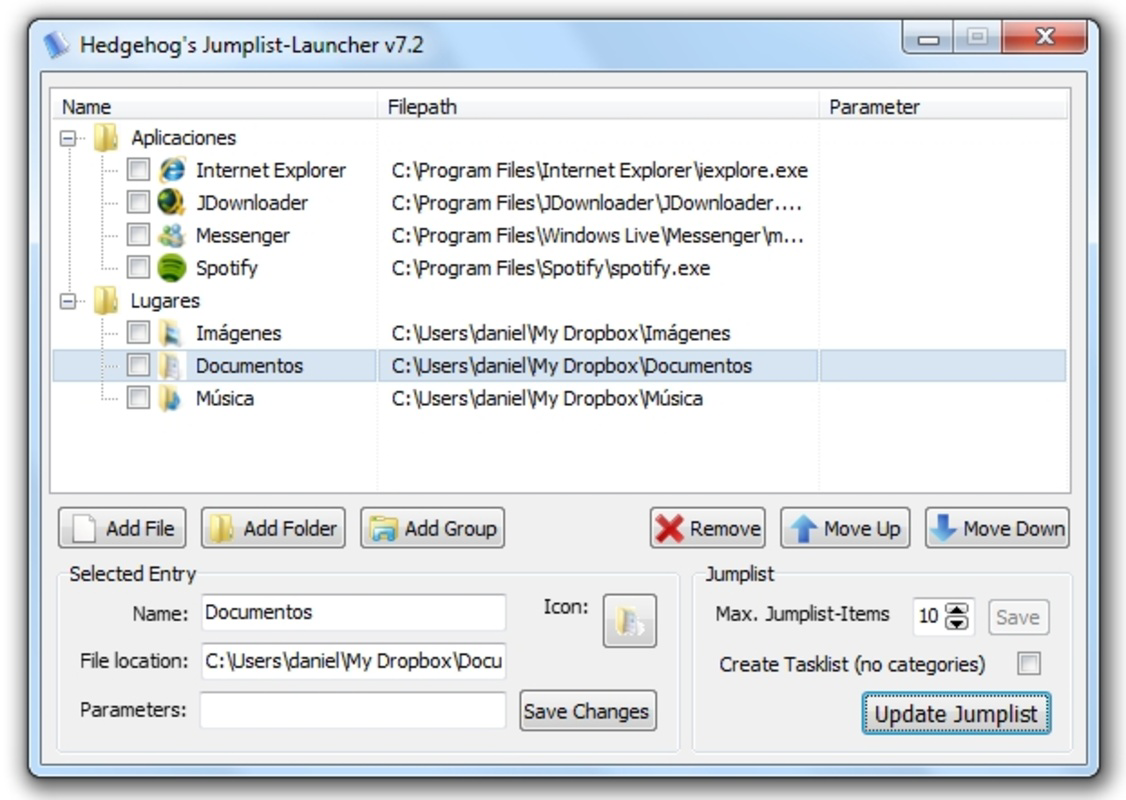
- Custom Jumplist Creation: Users can generate personalized jumplists for any application, even fictional ones, allowing for a tailored pop-up menu on the taskbar. This feature enables rapid access to frequently used resources without navigating through multiple folders.
- Shortcut Management: The app supports adding shortcuts to files, folders, websites, and installed applications. This functionality simplifies the process of consolidating essential links into a single, accessible menu.
- Group Organization: Shortcuts can be grouped into categories, such as “Work,” “Personal,” or “Development Tools.” This organizational structure reduces visual clutter and improves navigation speed.
- User-Friendly Interface: Designed for ease of use, Jumplist-Launcher requires only a simple executable run. Once active, users can access the jumplist by right-clicking the system tray icon, making it intuitive for users of all skill levels.
- Highly Customizable Options: Users have control over the placement and arrangement of groups and links, allowing for a personalized desktop experience that aligns with individual workflows.
For example, a graphic designer might create a jumplist with groups like “Design Tools,” “Client Projects,” and “Reference Sites,” enabling one-click access to essential resources. Similarly, a student could organize shortcuts by course or semester, reducing time spent switching between applications. These real-world implementations demonstrate how Jumplist-Launcher enhances daily productivity through intelligent organization.
Interface, UX & Performance
The user interface of Jumplist-Launcher is minimalistic and focused on functionality. It operates primarily through the system tray, where a small icon represents the active application. Right-clicking this icon triggers the customizable jumplist menu, which appears in a clean, readable format. The layout is straightforward, with groups clearly labeled and links displayed in a logical hierarchy. Navigation is intuitive, requiring no learning curve for basic operations.
Although the developer did not list formal performance metrics, the app’s file size of 2.5 MB suggests a lightweight footprint, which typically correlates with low memory usage and fast startup times. The application is designed to run in the background without interfering with other processes, making it suitable for systems with limited resources. Responsiveness is expected to be high, given the simplicity of its core functions.
Stability appears to be a strength, as the app has been available since 2010 without reported major issues. However, specific compatibility details for modern Windows versions were not disclosed. Users should exercise caution when running legacy software on updated systems. Overall, the user experience emphasizes efficiency, with minimal friction between user intent and action.
Platform Compatibility & Technical Requirements
Jumplist-Launcher is designed for the Windows platform and is compatible with Windows 7, as indicated by its release date and purpose. The application is distributed as a standalone executable, requiring no installation or administrative privileges. The file size is 2.5 MB, which is relatively small and suitable for quick downloads and low-bandwidth environments.
The developer did not specify minimum OS requirements beyond the known compatibility with Windows 7. No information was provided regarding support for Windows 8, 10, or 11. Similarly, hardware specifications such as RAM, processor, or disk space were not listed. Users should ensure their system meets general requirements for running Windows 7 applications.
Compatibility with 64-bit systems was not explicitly confirmed. However, given the app’s age and lightweight nature, it may function on modern 64-bit platforms through compatibility mode or emulation. No updates or version changes have been documented since the initial release, suggesting the app is no longer actively maintained.
Pros and Cons
Pros
- Free to download and use with no hidden costs
- Lightweight at only 2.5 MB, ensuring minimal system impact
- Simple setup with no installation required
- Highly customizable jumplists for personalized workflows
- Intuitive interface accessible to users of all skill levels
Cons
- No official updates since 2010, raising concerns about long-term compatibility
- Compatibility with modern Windows versions not confirmed
- Limited documentation or support resources available
- Not available for mobile platforms or other operating systems
- Dependent on Windows 7, which is no longer supported by Microsoft
FAQ
Is Jumplist-Launcher safe to download and use?
Yes, the app is free and distributed as a standalone executable. However, users should ensure they download it from trusted sources to avoid malware or tampered versions.
Can I use Jumplist-Launcher on Windows 10 or 11?
While the app was designed for Windows 7, it may run on newer systems using compatibility mode. However, official support is not available, and performance may vary.
Does Jumplist-Launcher require installation?
No, it is a portable application that runs directly from the executable file without installation or registry changes.
Is the app regularly updated?
No updates have been released since 2010. The developer has not announced any plans for future development or patches.
Can I create jumplists for any application?
Yes, the tool allows users to create custom jumplists even for fictional or non-existent applications, providing full control over the menu content and structure.
Final Thoughts + CTA
Jumplist-Launcher remains a niche but effective tool for Windows 7 users seeking to enhance their desktop productivity. Its ability to organize shortcuts into customizable, easily accessible groups offers a tangible improvement in workflow efficiency. While the lack of updates and modern compatibility may limit its relevance for newer systems, it continues to serve as a reliable utility for legacy environments.
For users still relying on Windows 7 or those who value minimal, no-frills tools, Jumplist-Launcher delivers consistent value with zero cost. Its simplicity, portability, and customization options make it a standout in the utilities category. Despite its age, it remains a functional solution for those who prioritize organization and quick access.
Download Jumplist-Launcher now


